Expert forecasts
Hourly and up to 10 days: temperature, feels-like, wind, gusts, humidity, pressure, UV, precipitation. Tap any value to dive into the detail.
Weather for iPhone, iPad and Apple Watch
Liquid Weather fuses the world’s best weather models — AROME, ICON, ARPEGE, GFS, ECMWF — into a fluid liquid-glass interface of rare precision.
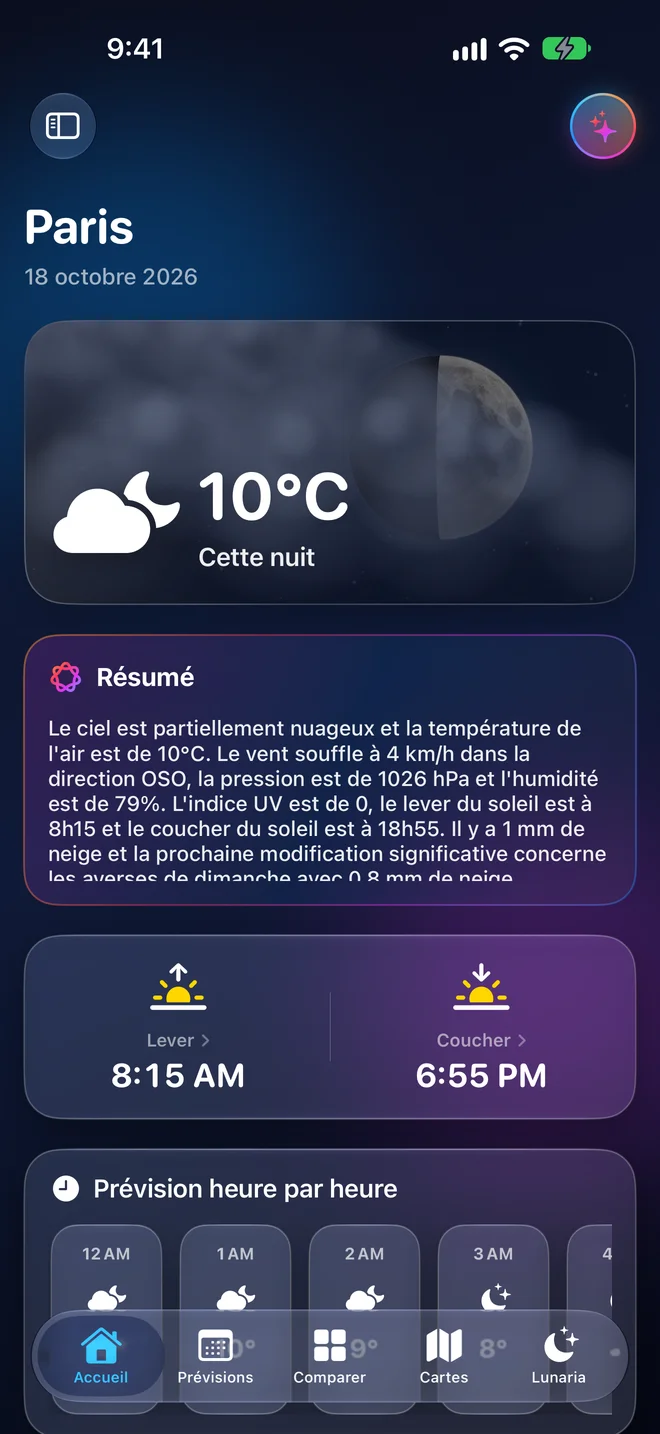
Explore the app
These aren’t mock-ups: they are real screenshots of Liquid Weather. Scroll the screen, tap the tab bar, switch modes — just like on your iPhone.
Scroll the screen with your mouse or finger · tap the tab bar · the app is shown in French (7 languages available)
Features
One app to understand the weather now, the weather coming, and how far to trust it.
Hourly and up to 10 days: temperature, feels-like, wind, gusts, humidity, pressure, UV, precipitation. Tap any value to dive into the detail.
Official MeteoAlarm warnings for your area, useful notifications and risk indicators you can read at a glance.
A liquid-glass interface made for iOS: everything responds, everything animates, nothing clutters.
iPhone, iPad, Apple Watch. Home and Lock Screen widgets, complications, a risk dashboard on iPad.
Under the hood
The maps read the open files from Météo-France, DWD and NOAA and decode them on your device. No Liquid Weather server sits between you and the official data.
Privacy
No sign-up, no login: open the app and go.
No advertising, and no advertising tracking system of its own.
Allow it for local weather, or simply pick a city. You stay in control.
FAQ
Yes. The app is free, with no ads and no subscription.
Forecasts come from Open-Meteo. The maps read open data directly from Météo-France (AROME, ARPEGE), DWD (ICON) and NOAA (GFS). The Moon is computed on the device; lightning comes from the EUMETSAT satellite; warnings from MeteoAlarm; wildfire risk from Copernicus EFFIS.
No, and the app says so plainly: they are model forecasts, never radar observations. Only the lightning layer is a satellite observation.
iPhone, iPad and Apple Watch. Summaries and the AI assistant work on devices that support Apple Intelligence.
No. It is optional: you can pick a city by hand and change the permission any time in iOS Settings.
By email at supportliquidweatherapp@gmail.com, or from the Support page. We read everything.
A question, an idea, an issue? Write to us — we read everything.